
Aion 2 interactive map: pet-farming guide
Reviewed 2026-11-04 · 10 min read
Use an Aion 2 interactive map alongside our pet-camp ledger. Filter regions, names and listed levels, check dated sources, and plan without live-pin claims.
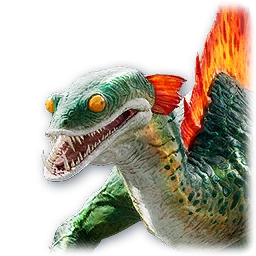
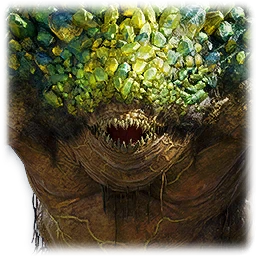
In-game pets matched to the farming camps. See the recorded locations below.
A map companion for a specific farming question
Looking for an Aion 2 interactive map, also searched as “aion2 interactive map”? This guide answers the pet-farming question: which region and named camp should I check? Our interactive tool is a camp and region ledger using this site’s existing records. This is not a pin map or a live-pin competitor. It has no live markers, player tracking, respawn timers or coordinate search.
The map-and-ledger workflow was reviewed on 4 November 2026. The underlying camp snapshot is dated 14 October and the reward-source review is dated 15 October. This editorial update does not make those extracts current live-server measurements. Start with the location ledger and retain the source date while you plan.
1. Read the game map from the region inward
Confirm your client region and the displayed zone name first. Then identify a named sub-area, a travel point you have actually unlocked, and the relevant monster name. Translations can differ between clients. Match more than one name before assuming that a similarly named area is the same camp.
Open the in-game map and inspect its legend and available filters. Use the controls your client exposes rather than relying on a key binding from a different version. Zoom from the region to the local terrain, compare the camp name and check whether your character can reach it through normal progression.
This site does not verify terrain paths, flight stamina, quest gates or faction access in real time. If the map shows a locked or inaccessible area, respect the client state. A listed reward is not proof that a new character can travel there.
2. Match the ledger to Verteron, Altgard or Reshanta
The reviewed reward extract places most located field pets in Verteron and Altgard. A smaller set also appears in Chaotic Lower Reshanta. Pick the region relevant to your character and progression before comparing camp totals.
Verteron and Altgard pages group the pets and named areas present in this extract. Reshanta is a partial list, not an atlas of every island. Eltnen, Morheim and later-zone coverage are absent from this reward extract; absence is a source gap, not a claim that those maps contain no pets.
Use the region, name and level filters
Open the interactive camp ledger. All regions starts with the ten archived camp rows. Choose Verteron or Altgard to narrow that list, then search a camp or pet name using the source spelling. Region totals count pets with listed areas; the result counter counts camp rows. They measure different things.
The optional level field keeps rows whose recorded level band contains your entry: 35 includes both 35 and 35–36. It does not calculate a recommended character level or check faction, quest access or current drops. Leave it empty to keep every level. Filters combine, so a pet name and level must match the same row. Reset filters returns to all ten camps.
Worked example: select Altgard, enter Swarm and level 35. The existing snapshot returns Fafnite Deposit (35–36), density 57, with Swarm 45, Parasite Swarm 6 and Mudthorn 6 in its separate pet spawn-count list. Open Altgard’s pet records, then Swarm’s source record to inspect its listed reward monsters. That pet-level list does not prove that every named monster occurs at Fafnite Deposit. Confirm the full camp and monster names in your client before farming.
Selecting Chaotic Lower Reshanta shows a coverage note and a link to its pet records, because the camp snapshot has no density rows there. A name or level filter with no matches means only that these archived rows do not answer the query. Clear the filters or check the region page; do not infer a new location, a removed pet or a zero drop rate.
3. Read density as a snapshot, not an hourly reward
The camp table uses Raid Relay’s 14 October 2026 Global launcher 27 extract. Its density unit is pet monsters within 50 metres. It is not distinct species, expected souls per hour or a promise that every monster is currently alive. Do not compare it directly with another site’s count of mounts per entire zone.
Fafnite Deposit is listed at 57 and Eternal Isle at 55 under that source’s density measure. Those figures help shortlist an area, but level, access, competition and kill time can reverse the practical order. The source also lists pet names and their spawn counts; those figures need not add up to the separate radius-based density figure.
Use easy-to-miss camp notes for a small shortlist and where to farm for soul and level caveats. Start near your own level instead of choosing the largest number on the page.
4. Run a small field check before committing your session
Record the chosen pet, monster, named camp, character level and client version. Travel using the game’s normal map and compare the observed names. Check a modest sample of kills, inventory changes and time spent moving. This is your own observation, separate from the archived extract.
If the target is missing, first compare spelling, faction, client and area boundaries. Then consider that the source may be incomplete or outdated. Do not turn a temporary empty camp into proof that the pet was removed. Conversely, seeing a related monster nearby does not establish an undocumented soul drop.
Return to the pet page for its source row and acquisition status. Missing reward tables, missing locations and no soul item describe different gaps. Keep those labels distinct when deciding whether to move to another camp.
What this map guide deliberately leaves unknown
No coordinates, hidden teleport routes or guaranteed respawn intervals have been verified by this project. We do not reproduce an atlas’s pin database. For a separate interactive navigation tool, follow its own source and version notes, then cross-check against your client.
The client reward weight printed as 1% is not converted into an expected kill count here. Community same-level kill observations are not our controlled tests. For the full distinction, read Soul Crystal farming and the source register.
Frequently asked questions
Is this an Aion 2 interactive map with live pins? No. This is an interactive camp and region ledger for pet farming. Its filters narrow existing dated records; they do not show player position, coordinates, live spawns or respawn timers. Use the in-game map for navigation.
How do I use the interactive ledger to choose a pet camp? Choose a region on Locations, search a camp or pet name using the source spelling, and optionally enter a level within the listed camp band. Open the region’s pet records, check the target pet’s source, then compare the full camp name in your client. Reset filters to see all ten archived camps again.
Why does Reshanta show pet records but no camp results? The reward extract and the ten-camp density snapshot are separate sources. Chaotic Lower Reshanta has pet records but no density rows in that camp snapshot. An empty filter result is a coverage gap, not evidence that a region has no pets.
Where is the Aion 2 world map? Use the in-game map for navigation. This site is a pet-focused regional companion, not a complete world map.
Does a hidden spot mean a secret cave? No. These are named camps that can be easy to overlook, not verified secret routes or treasure coordinates.
Can I farm a Special pet from these camps? A camp listing alone does not establish a Special soul source. Check the individual pet’s acquisition status first.
Sources and review scope
Location evidence: aion2quest.pro’s client reward extract; camp-density evidence: Raid Relay’s 14 October 2026 Global launcher 27 extract. Both are attributed external extracts. The recorded data dates are retained. Review all confidence notes in the source register.